Researchers – please note the changes in our submission procedure for billable research work.
All projects can be submitted here: Project Submission Form
Please read these instructions in detail before submitting your first project!
After submission your project will be queued for projection. Once the project is ready for pickup you will receive an email with pickup instructions. The most common reason for delayed project submissions are unshared project folders.
Please check you spam folder for Microsoft Power Automate messages!
Please read these instructions in detail before submitting your first project! Heading link
After submission your project will be queued for projection. Once the project is ready for pickup you will receive an email with pickup instructions. The most common reason for delayed project submissions is unshared project folders.
Please check you spam folder for Microsoft Power Automate messages!
Digital Fabrication Lab Project Instructions Heading link
If you need multiples of a part please indicate in the settings box. You can submit multiple files for multiple processes with one submission (for example, some files are FDM printed, some are laser cut).
See the following graphic for a breakdown of what settings are available at this time. Please note that specific colors or materials may be unavailable – we’ll contact you if that is the case. Any information not provided will either be set to the indicated default value. If you have any questions please contact us via email.
Please include rough part dimensions in your project submission so we can check units when importing your files.
-
FDM 3D Printing
The default material for 3D printed parts is PLA. We will select a machine based on the size of submitted parts. Color is randomly chosen. We will adjust settings as necessary – our defaults are good for most situations.
- Supports are generated where required and are removed and discarded – unless requested otherwise.
- Large parts must be printed on large format printers, parts too large for those machines will need to be redesigned.
- Unreasonable settings requests will be rejected.
- Some parts may need to be redesigned to be manufactured.
- High cost projects may require a consultation appointment.
Additional Material Options:
- PLA – Default, rigid, minimal warping, good for most projects
- Colors: Black, Gray, White, Transparent, Red (other colors may be available)
- Large format prints are in Gray only
- PETG – Slightly flexible, some warping, good for parts subject to large shocks
- ABS – Slightly flexible, significant warping, durable with high temperature resistance
- Nylon – Fairly flexible, significant warping, tough parts.
- ABSplus P430 – ABS printed with water soluble support structures. Contact us to discuss your project in advance
Additional materials or colors are available after a consultation.
-
Resin 3D Printing
The Stratasys Objet prints in a transparent material (VeroClear) with a soluble support material. Orientation is determined by printer software but can be over-ridden.
The default printing on the Objet is a uniform matte finish on the part, but upward facing surfaces can be printed glossy, if desired.
We only stock VeroClear but may be able to print other colors, please consult with us before planning a project. We may bill for the material used when transitioning to or from VeroClear and parts in other colors may incur significant delays as we batch orders.
Due to high material costs the Objet is not well suited for large parts. Please note the Objet is not more dimensionally accurate than the FDM printers.
The Formlabs Form3+ primarily uses Grey resin. Other materials are possible – contact us for details.
-
Laser Cutting
Please specify material thickness and color when submitting projects for the laser cutter. If your project requires extensive or complicated engraving we may have to set an appointment to go over designs. Please note stock thickness is nominal and may vary.
Stocked Materials:
- Acrylic
- Thickness: 1/16″, 1/8″, 1/4″
- Color: Black, White, Clear (other colors only available in 1/8″, contact us for details)
- Birch Plywood
- Thickness: 1/8″, 1/4″
- MDF
- Thickness: 1/8″, 1/4″
Please contact us for information on other materials.
Waterjet cutting
The waterjet can be used to cut a variety of materials that cannot be cut with the laser, including thin metal.
- Max thickness: Mild Steel – 1/8″, Aluminum 1/2″
- Other materials: Contact us
- Acrylic
-
CNC Milling
Milled Circuit Boards (PCB milling):
Single or double sided milling will be determined by submitted file. An appointment for your first board is recommended so we can help you get a design
CNC milling:
Please specify material and submit STEP files. We will contact you to discuss details. Not all materials or geometries can be milled.
-
Graphic Design
Poster printing:
Please specify poster size, at least one dimension should be 24″ or 36″ to coincide with the width of the printer to avoid extensive white space. We do not have the ability to cut posters to custom sizes.
Posters are printed on glossy photo paper unless requested otherwise (matte printing is the only other option we stock).
Posters can be rolled but any transportation tubes are the responsibility of the user when picking up the poster.
We cannot guarantee flawless printing. We will print conference posters but highly suggest they are printed by a professional printing service.
Vinyl decals:
Please specify color. By default vinyl stickers will be weeded and have transfer tape applied.
Printed Stickers:
If you do not have a vector cut line please describe what you want (i.e. outline, rectangle, circle).
For all graphic design submissions: please check that all content is final and graphics are high enough resolution to print correctly at your requested size. We do not spell check or proof posters.
-
Other
For questions about any other projects please contact us to set up a consultation meeting
Other Instructions Heading link
-
Machine Shop Projects
Projects submitted to the Makerspace machine shop go through additional review and consultation steps before being made. We will reach out via email to discuss the project.
Please submit the following in a properly shared folder using the Project Submission Form linked at the top of the page:
- All CAD Models (STEP preferred) and Assembly files showing parts. STL files are not usable.
- Drawings of all parts to be machined with proper dimensions and tolerances. Please make sure drawings are clear and tolerances are reasonable (we recommend the tightest tolerance band being 0.010″ (0.2mm)). Please consider looser tolerances where possible and identify critical dimensions on your drawing.
- A detailed description of materials, hardware needed, and design intentions. Please indicate whether you have your own material.
Projects may need to be redesigned for feasibility – we recommend consulting with Makerspace staff early and often throughout the design and build process. Please consider the use of the Digital Fabrication tools the Makerspace offers (3d printers, laser cutters, etc) before moving to machined components – we may require prototypes before accepting a project. Parts outside of our capabilities may need to be sent to an outside manufacturing service. It may be necessary for us to re-evaluate mid-project if we encounter unexpected difficulties.
We encourage you to use standard hardware and fasteners – we typically will not make standard parts that can be purchased from a supplier such as McMaster Carr.
Turnaround time and the charge for raw materials and necessary hardware will be discussed and decided on a per-project basis. The machine shop is only for classwork and organization projects – all research projects will be referred to the RRC machine shop.
-
Sharing Files
For file types please check under CAD AND FILETYPES.
We need the files for each job you submit to be put in a Box folder that is shared in a way that our staff can see the files. Box can be accessed here: https://uofi.app.box.com.
We suggest creating a “Makerspace” folder with sub folders for each submitted job
Box sharing
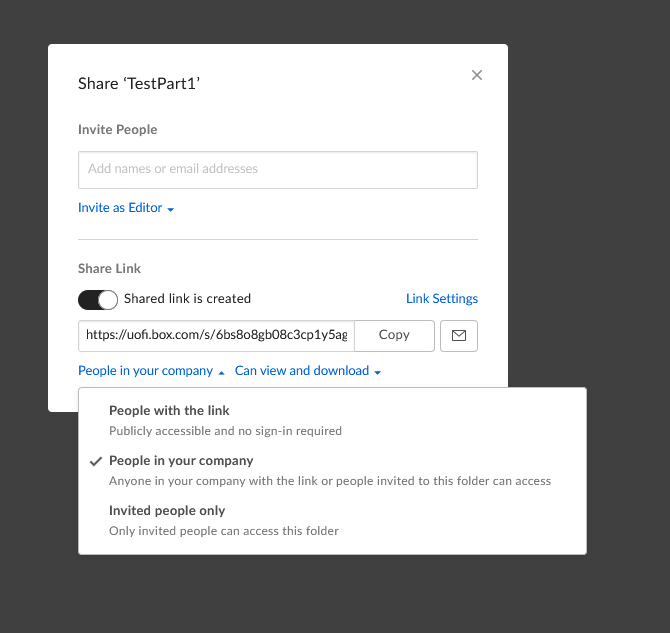
Box settings to share files – make sure that the files are set to “People in your company” or “People with the link”
Other services
Other file sharing services may work – Dropbox, Google Drive, etc. However the parts for one job should be in their own folder and should be publicly accessible using just the link.
Please make sure the files don’t change, get hidden, or get removed before your job is completed! We may grab the files at any time after submission – even if you have not gotten confirmation emails yet.
If you are unable to use Box you may have to enable it here: https://cloud-dashboard.illinois.edu/cbdash/
-
Billing information
A CFOAP account number must be provided for billable projects. We do not accept any other form of payment. The minimum charge per project is $5.
Projects submitted without CFOAP may face production delays. CFOAP number can be provided via email if necessary.
-
Prodution Issues
If there are any problems with your project or we need clarifying information we will email the address used to submit the request. If we don’t hear back in three business days we may remove your project from the queue and you’ll need to to resubmit.
The most common issues are:
- Improperly shared files – make sure files are visible publicly or to any logged in UIC user
- Incorrect file types – CAD files instead of STLs, STL files for laser cutting, etc
- Requests for unlisted colors or materials (particularly note the color restrictions for large parts)